
Huawei Cloud CCE has some platform-specific considerations for migrations. LoadBalancer services require explicit annotations for provisioning and are not created automatically. Legacy storage classes like SFS 1.0 are deprecated and may cause provisioning or scheduling issues. Using supported storage classes such as SFS 3.0 (csi-sfs) and planning PVC sync operations appropriately is recommended.
Below are the some known limitations.
1. LoadBalancer is not Provisioning automatically in Huawei CCE
In Huawei Cloud CCE, a LoadBalancer is not provisioned automatically for services of type LoadBalancer, unlike some other cloud providers.
If you plan to migrate a LoadBalancer-type service to a Huawei CCE cluster and require a LoadBalancer to be provisioned, the necessary service annotations must be added using SWIFT.
Please refer to the Any-to-Huawei migration KB (Step 4) for detailed instructions on adding LoadBalancer annotations.
Alternative Option
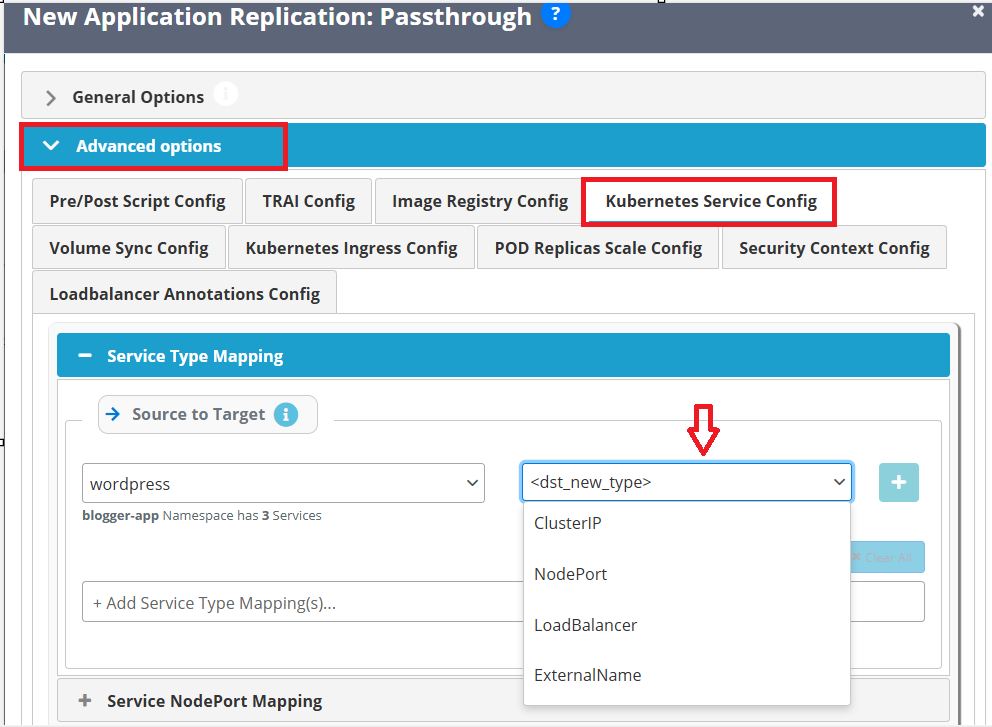
If a LoadBalancer is not required, you can modify the service type during migration using SWIFT:
Go to Advanced Options. > Open Kubernetes Service Type Config > Change the service type to NodePort or ClusterIP as needed.
2. Multi-PVC sync is not supported during Stage 2 sync when using SFS Turbo non-CSI storage classes.
Multi-PVC sync is not supported during Stage 2 sync when using SFS turbo non-CSI storage classes. During Stage 2 sync, all PVCs are selected for synchronization by default, but the migration TRAI pod is not deployed in SWIFT for this stage when these storage classes are used. Additionally, SFS Turbo Non CSI storage classes do not support attaching multiple PVCs to a single TRAI pod. Because of this limitation, multiple PVCs cannot be processed in a single Stage 2 sync operation.
SFS Turbo non-CSI storageclasses like ‘efs-performance’ and ‘efs-standard’ do not allow attaching multiple PVCs to a single pod.
Currently, SWIFT does not support multi-TRAI pod support for stage2 syncs, so only a single PVC is allowed for stage2 sync and Stage12 drpolicy operation when SFS Turbo non-CSI storageclass is involved.
This applies to storage classes such as:
- efs-performance
- efs-standard
This limitation will go away in future releases of SWIFT when it starts supporting multi-TRAI pods for stage2 sync.
Solution:
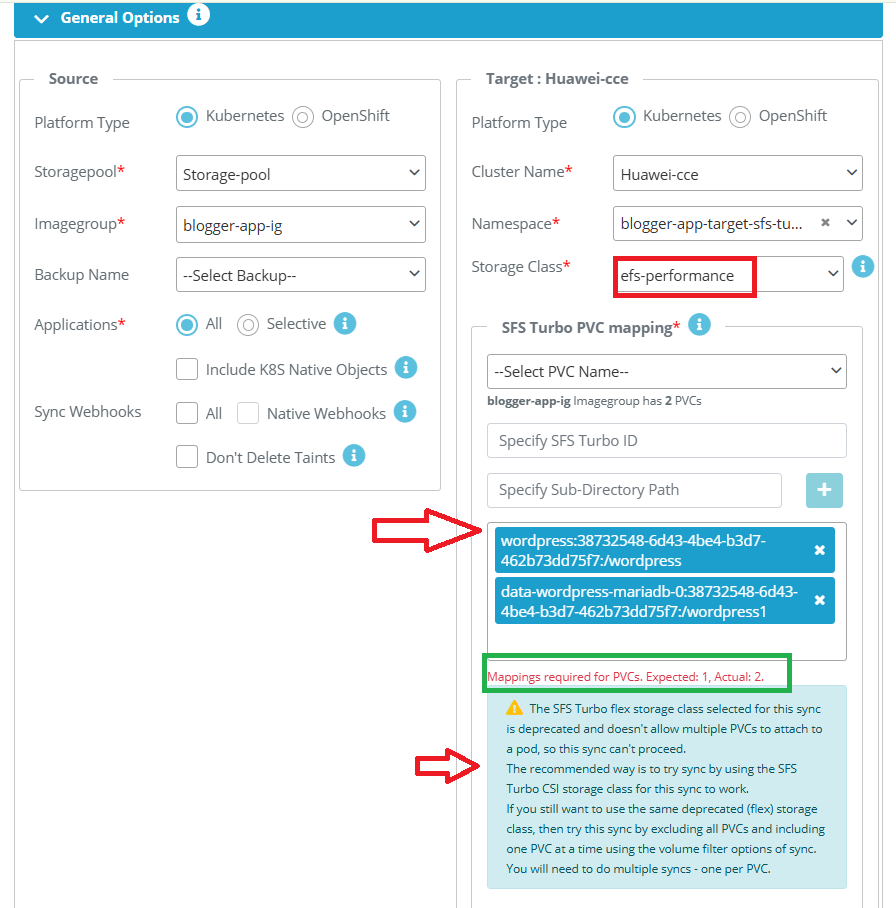
As shown in the screenshot above, two PVCs were selected for mapping; however, the message indicates “Expected 1 only.” This means you must select only one PVC at a time during Stage 2 sync.
For syncing with the SFS Turbo non-CSI storage class, refer the KB - How to sync with SFS turbo storage class.
3. If a user is using the SFS 1.0 storage class on the target cluster and provisioning fails with one of the following errors, a possible reason could be the presence of stale volumes in Huawei Cloud.
Example Errors
Mount Failure
Warning FailedMount 12m kubelet, 192.168.0.141 MountVolume.SetUp failed for volume "pvc-cac87d83-8fa5-49b7-a465-12fd91453b78" : rpc error: code = Internal desc = [884e04dc-e0ef-4e72-a348-148cd6b46de8] failed to execute cmd: "systemd-run --scope mount -t nfs -o vers=3 -o timeo=600 -o noresvport -o nolock sfs-nas01.ap-southeast-1a.myhuaweicloud.com:/share-d93a59c1 /mnt/paas/kubernetes/kubelet/pods/fc88f372-b8b3-45d8-a892-8d29187b9c33/volumes/kubernetes.io~csi/pvc-cac87d83-8fa5-49b7-a465-12fd91453b78/mount". outputs: Running scope as unit: run-r83d3f92339ac4bf88e39499d4d5f9a39.scope
or
TRAIPOD deploy failure
DR sync failed.
Detailed Error: Failed to deploy the TRAIPOD for the target cluster pt-cce-1512-test [ ERROR: TRAIPOD did not get ready for the K8S 'pt-cce-1512-test'. ERROR: Unschedulable: 0/2 nodes are available: 2 node(s) had volume node affinity conflict. preemption: 0/2 nodes are available: 2 Preemption is not helpful for scheduling.

TRAI Service Events:
==============================
Type           Reason                                            Age       From                                              Message
----           ------                                            ---       ----                                              -------
Normal         EnsuringLoadBalancer                              12m       service-controller                                Ensuring load balancer
Normal         EnsuredLoadBalancer                               12m       service-controller                                Ensured load balancer

TRAI Pod Events:
==============================
Type           Reason                                            Age       From                                              Message
----           ------                                            ---       ----                                              -------
Warning        FailedScheduling                                  12m       default-scheduler                                 0/2 nodes are available: 2 node(s) had volume node affinity conflict. preemption: 0/2 nodes are available: 2 Preemption is not helpful for scheduling. ]
Possible Cause
SFS 1.0 storage offering is deprecated by Huawei and phased out in all regions, [ refer this - Huawei official documentation]. sync operations may sometimes fail and dynamically provisioned volumes may remain in the cloud environment. In some cases, the storage class may fail to provision a PV, and the TRAI pod deployment may fail with a "volume node affinity conflict" error.
Solution:
The recommended solution is to remove stale volumes from Huawei Cloud. Please contact the Huawei Cloud support team for assistance in identifying and safely deleting any stale volumes.
Example:
Storage class:
- nfs-rw
- csi-nas
Workaround : SFS 1.0 is deprecated and is not recommended for use. It is advised to use the General Purpose File System (SFS 3.0) storage class, such as csi-sfs.